
Overview of Toolkit Features
The CostFormation Toolkit extension for VS Code supports all aspects of authoring custom CloudZero Dimensions, including downloading, validating, and publishing of your custom definitions.
The following describes the available features. More in-depth information on how to use these features is provided on the remaining pages in this section.
CloudZero Sidebar
The Toolkit adds a dedicated CloudZero Sidebar to VS Code. The sidebar displays your current organization and lists all namespaces, allowing you to browse, download, and manage definitions directly from the sidebar. See Namespaces and the CloudZero Sidebar for details.
Namespaces
Namespaces let you organize your CostFormation definitions into logical groups. Every organization has a default User:Defined namespace, and you can create additional namespaces (for example, User:TeamAlpha) to separate definitions by team, project, or purpose. Operations like downloading, publishing, and restoring apply per-namespace. See Namespaces and the CloudZero Sidebar for details.
Organization switching
If you have access to multiple CloudZero organizations, you can switch between them from the sidebar or the command palette without re-authenticating. See Namespaces and the CloudZero Sidebar for details.
Autocompletion
Several of the definition language constructs can be automatically completed with VS Code autocomplete functionality. Autocomplete provides templates for things like rules and transforms, as well as dynamic source information such as resource tags or Kubernetes labels, by using live data from the CloudZero platform.
Inline static validation
While you are editing your definition files, the extension provides inline static validation as you type. This validation will immediately alert you with visual cues when you have ill-formatted YAML or have structural and syntactic errors in your definitions.
Download definitions
The extension can retrieve the current live definitions for a specific namespace so you can be sure you are editing the latest definitions. The extension can also download older versions of the definitions to allow you to view previous versions or even roll back some definitions.
Line-by-line diff
When you are editing your definitions, you can review your changes with a line-by-line diff of your current edits against the currently published definitions for that namespace.
Telemetry code lens
To provide more context when you are editing Dimensions, this feature will display an annotation above the definition of any Dimension that is referenced by a telemetry stream.
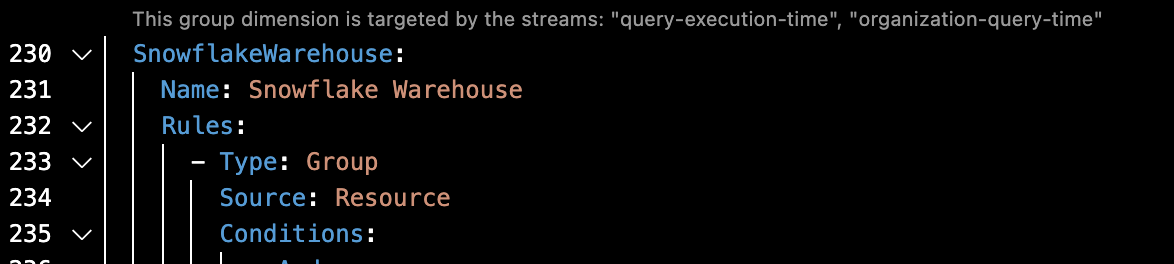
A telemetry stream tracks usage for the elements of one or more Dimensions. If one of those referenced Dimensions is removed, it will render the stream invalid and unavailable for use in authoring Allocation Dimensions. Clicking on the inline annotation will open the Telemetry Streams page for your organization, where you can see detailed information about each telemetry stream.
The code lens can be toggled on and off. To do so, open the settings UI (Code > Settings > Settings) and uncheck the Code Lens › Telemetry: Enable setting.

Full validation
While the inline static validation provides immediate feedback as you type, when you save a definitions file locally, the CloudZero platform provides full validation, including validation of sources, cycles in your dependencies, and so on.
Publish definitions
When you have finished creating your definitions, you can publish them directly to the CloudZero platform, making your definitions available to all of your CloudZero users through the CloudZero Cost Explorer. Publishing applies to the namespace associated with the definitions file you are working in.
Restore older definitions
If you have published a set of definitions and discover a problem, you can back out of your changes by restoring your definitions to a previous version within that namespace.
Updated 3 months ago