

CloudZero uses key-based authorization to secure API access. To authenticate your requests, include your API key in the Authorization header:
curl -X GET https://api.cloudzero.com/v2/insights \
-H "Authorization: AbCd1234EfGh5678AbCd1234EfGh5678AbCd12"This is not a bearer token, so there is no
Bearerprefix in the Authorization header.
Manage API keys
An organization can have multiple API keys. To view and manage all API keys for your organization, navigate to Settings > API Keys.
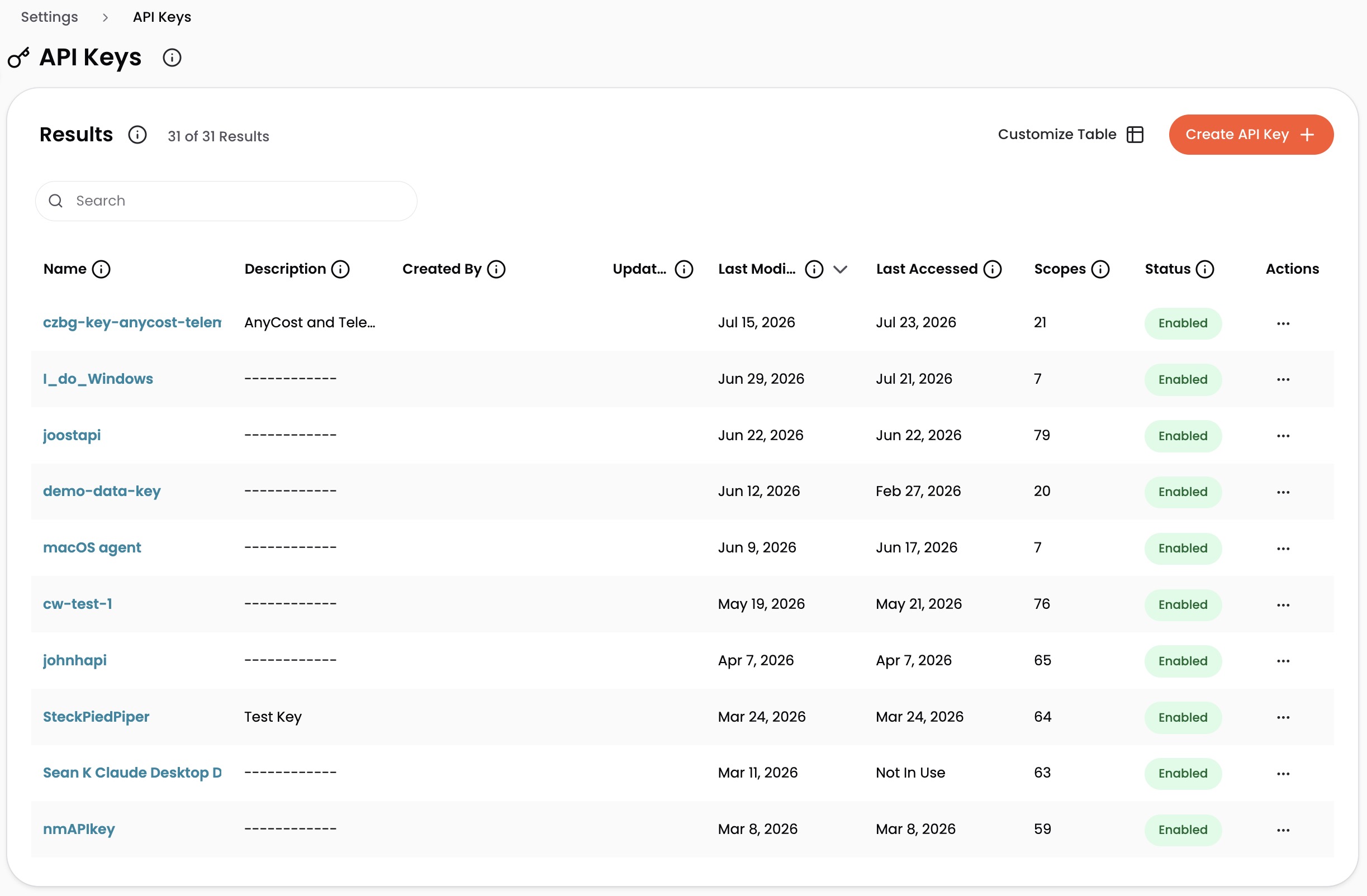
Only users with the necessary permissions can manage keys. Each key can be assigned one or more API scopes, which grant access to specific endpoints in the CloudZero API.
The API Keys page displays a list of keys with the following information:
- Name
- Description
- Created By: Email of the user who created the key
- Updated By: Email of the user who last modified the key
- Last Modified: Last update timestamp
- Last Accessed: Last usage timestamp, or "Not In Use" if the key has never been used
- Scopes: Number of granted API scopes
- Status:
EnabledorDisabled
If your organization had an API key before multiple keys were supported, it is listed as Legacy API Key.
For keys that use fixed scopes, CloudZero does not automatically grant access to new API endpoints. When new endpoints are released, you must edit each key to manually add the necessary scopes. Keys that use managed scopes stay current on their own.
Create an API key
-
Navigate to Settings > API Keys.
-
Select Create API Key.
-
Enter a name for the key (minimum 3 characters, must be unique).
-
Enter a description (optional).
-
Under Scopes, choose how the key is scoped. See Fixed and managed scopes for which to pick.
- Managed scopes: select one or more use cases, such as Send AI Telemetry. CloudZero keeps the key's scopes current as new endpoints ship.
- Fixed scopes: select each scope individually. You must select at least one. Scopes are grouped into categories under six blocks, such as Read cost data and Configure. Use the search bar or expand categories to find specific scopes. For information about each scope, refer to API key scopes.
-
Select Create API Key.
-
Copy the API key displayed. It will not be shown again.
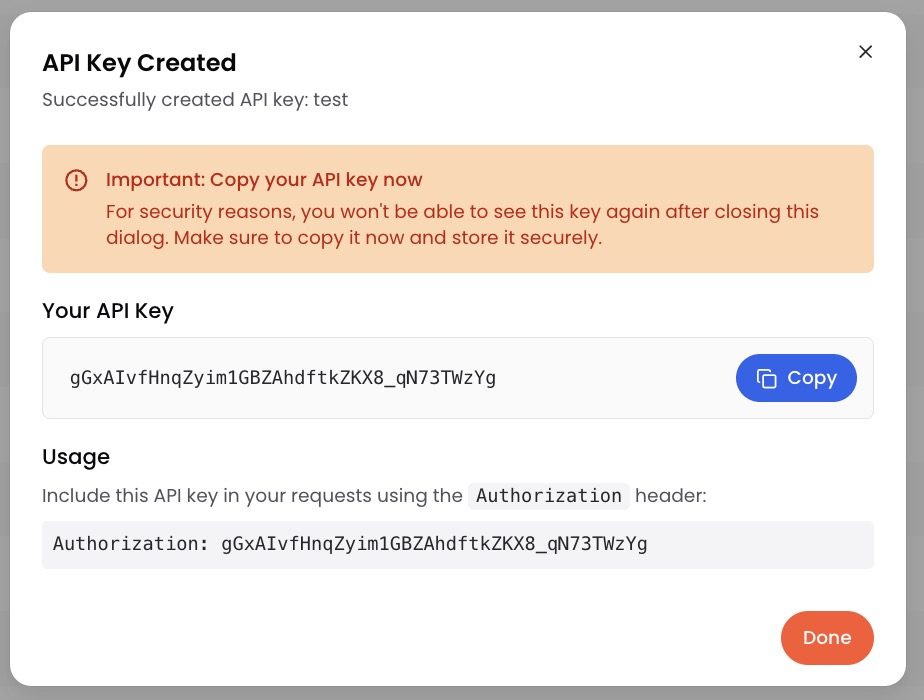
- Select Done.
New keys are Enabled by default.
Edit an API key
- On the API Keys page, locate the key you want to modify.
- Click the key name, or select the three-dot icon in the Actions column and select Edit.
- Modify the Name, Description, or Scopes as needed. For information about each scope, refer to API key scopes.
- Select Save Changes.
On a key that uses fixed scopes, a save that removes a scope or adds a replacement opens a Save scope changes dialog. It lists the replacements, the other scopes you added, and the scopes you removed. Select Save changes to confirm, or Cancel to keep editing.
Update out-of-date scopes
A key can hold a scope that is no longer Current (see Scope states). On the API Keys page, such a key shows a badge next to its name, such as 1 out of date. The count includes both Retired and Removed scopes.
To update the key:
- Click the key name to open the Update API Key panel.
- Above the scope list, a notice lists each out-of-date scope with a Retired or Removed badge. When a scope has a replacement, the notice names it.
- Add the replacement:
- For a Retired scope, select Use replacement where the notice offers it. The button checks the replacement and unchecks the Retired scope.
- For a Removed scope, check the replacement in the scope list, then uncheck the Removed scope in the notice.
- Select Save Changes, then confirm in the Save scope changes dialog.
Nothing changes on the key until you save. If you close the panel without saving, the key keeps every scope it had, and its Retired scopes keep working.
When a scope has no replacement, the notice says "No replacement exists." To drop the scope, uncheck it. Unchecking a Retired scope removes access the key still has. Unchecking a Removed scope changes nothing the key can reach today.
Enable or disable an API key
- On the API Keys page, locate the key you want to modify.
- Select the three-dot icon in the Actions column.
- Select Enable or Disable.
The Status column updates to reflect the change.
Delete an API key
Deleting an API key immediately revokes access for any services using it. This action cannot be undone.
- On the API Keys page, locate the key you want to delete.
- Select the three-dot icon in the Actions column.
- Select Delete.
- Type the exact name of the API key to confirm deletion.
- Select Delete.
Fixed and managed scopes
Every API key is scoped one of two ways. A key uses either fixed scopes or managed scopes, never both.
Managed scopes grant a use case rather than a list of endpoints. You select Send AI Telemetry or Send Billing Data, and CloudZero maintains the underlying scopes for you. When a new endpoint ships within that use case, keys already referencing it gain access without any edit. This is the better choice for send-only integrations, where the alternative is discovering later that a key was silently missing an endpoint added after it was issued.
Managed scopes are offered only for use cases that exclusively accept data. These endpoints return nothing about your organization beyond whether a submission was accepted, so widening one cannot expose data a key could not already send.
| Use case | What it grants |
|---|---|
| Send AI Telemetry | Ingest AI inference telemetry from any source. |
| Send Billing Data | Send billing data to an already-established connection. |
Fixed scopes grant exactly the scopes you select and nothing more. New endpoints are never added automatically, so a key keeps the same permissions until you edit it. Choose fixed scopes when a key reads organization data, when you need permissions narrower than a whole use case, or when an audit requires the grant to be an explicit, unchanging list.
API key scopes
The scopes below apply to keys that use fixed scopes. CloudZero organizes them into categories, grouped into six blocks named for what a key with those scopes can do. Each scope grants access to specific API endpoints. When creating or editing an API key, select the scopes that match how the key will be used.
AI
Ask questions, send AI telemetry
AI Hub (MCP)
Access the CloudZero AI Hub over MCP for AI assistants and agents.
| Scope | What it grants | Docs |
|---|---|---|
AI Hub (MCP) Accessai-hub:mcp | Use every AI Hub tool your organization has enabled across all of your data, including tools that write, such as sending telemetry and updating your organization context. | Guide |
This one scope covers every AI Hub tool your organization has enabled, with access to all of your organization's data. Role-based data access filters and permission set restrictions do not apply to API keys. Tools can read (for example, cost data, dimensions, telemetry, optimization recommendations, realized savings, resource metadata, and CostFormation definitions) and write (for example, managing organization context and logging Insights). To apply each person's data access and permissions, have them sign in individually instead (browser sign-in or an MCP OAuth client).
Send AI Telemetry
Ingest AI inference telemetry from any source.
| Scope | What it grants | Docs |
|---|---|---|
AI Telemetry (all sources)ai-telemetry-ingest:ingest-ai-telemetry | Send AI inference telemetry from any supported source, such as LiteLLM, Claude Code, or OpenTelemetry, without reading anything about your organization back. |
AI Device Control Plane
Enroll AI telemetry devices and report their liveness.
| Scope | What it grants | Docs |
|---|---|---|
Enroll Devicesai-control-plane:enroll-device | Register a device that sends AI telemetry and get a 7-day device token, which adds the device to your organization's device list. | |
Send Device Heartbeatsai-control-plane:heartbeat-device | Check in a registered device with its version and components, which extends its token and keeps its status current. | |
Ping Devicesai-control-plane:ping-device | Report that a device is reachable without a device token, which can add a placeholder device to your organization's device list. |
Send data in
Send usage, telemetry and billing data in
Telemetry & Usage Streams
Create and manage unit-cost telemetry streams and record engineering events.
| Scope | What it grants | Docs |
|---|---|---|
Send Engineering Eventsevents_v1:create_event | Record engineering events, such as deploys, on your organization's cost timeline. | Reference |
Send Allocation Telemetry (Legacy)unit-cost_v1:create_telemetry_stream | Send unit-cost allocation records through the older upload path, which adds to existing values and creates the stream if it does not exist yet. | |
Delete Telemetry Streamsunit-cost_v1:delete_telemetry_stream | Delete a unit-cost telemetry stream and all of its records, unless a custom dimension uses it. | Reference |
Manage Telemetry Recordsunit-cost_v1:manage_telemetry_records | Send, replace, or delete unit-cost telemetry records, including overwriting or removing records you sent before. | Allocation telemetry, Unit cost metric telemetry |
Read Telemetryunit-cost_v1:read_telemetry | Read the records sent to a unit-cost telemetry stream, without any cost amounts. | Telemetry stream records, Metrics records |
Kubernetes Agent
Send-only permissions for the CloudZero Kubernetes agent to upload container metrics.
The agent also requires the List Insights permission (listed under Insights & Anomalies) to validate its API key at startup. This is an authentication liveness check only — it is not used to read cost data — and is the only read the agent needs.
| Scope | What it grants | Docs |
|---|---|---|
Abandon Metric Uploadscontainer-metrics_v1:abandon | Mark agent uploads that never arrived as abandoned, without changing any data CloudZero already received. | Guide |
Send Cluster Statuscontainer-metrics_v1:get-status | Send the Kubernetes agent's cluster health and configuration to CloudZero for the Clusters page, without reading anything back. | Guide |
Legacy Metric Uploadcontainer-metrics_v1:legacy | Send container metrics through the older direct upload path that the agent install guide still requires, without returning any data. | Guide |
Upload Container Metricscontainer-metrics_v1:upload | Get upload links for the Kubernetes agent to send pod CPU and memory metrics, without returning any cost data. | Guide |
Send Billing Data
Send billing data to an already-established connection.
| Scope | What it grants | Docs |
|---|---|---|
Send AnyCost Billing Dataconnections:create_billing_anycost_billing_drop | Send AnyCost billing data for one month, which by default replaces everything previously sent for that month. | Reference |
Validate AnyCost Billing Dataconnections:create_billing_anycost_validate_billing_drop | Check AnyCost billing data for errors without storing or sending it. | Reference |
Read cost data
Read cost data and manage saved Views
Cost & Usage Data
Read cost, usage, dimension, and resource-tag data via the API.
| Scope | What it grants | Docs |
|---|---|---|
Read Cost Databilling:read_costs | Read your organization's cost over time, grouped and filtered by any dimension, across all of your cost regardless of any user's data access. | Reference |
Read Dimensionsbilling:read_dimensions | List the dimensions your cost can be grouped by, without their values or any cost. | Reference |
Read Resource Tagsbilling:read_resource_tags | List the tags on your resources, without any cost data. |
Views
Create, read, update, and delete saved Views.
| Scope | What it grants | Docs |
|---|---|---|
Create Viewsviews:create_view | Create a View for your whole organization, which can turn on anomaly detection and set who receives its anomaly and budget alerts. | Reference |
Delete Viewsviews:delete_view | Permanently delete a View for your whole organization, leaving any budgets built on it in place. | Reference |
Read a Viewviews:read_view | Read one View's filters, groupings, and alert recipients, without any cost data. | Reference |
List Viewsviews:read_views | List your organization's Views with their filters, groupings, and alert recipients, without any cost data. | Reference |
Update Viewsviews:update_view | Change a View's filters, groupings, or alert recipients for everyone who uses it. | Reference |
Act on cost
Create and change budgets, insights, recommendations, monitors
Insights & Anomalies
Create, read, update, and comment on cost anomalies / insights.
| Scope | What it grants | Docs |
|---|---|---|
Create Insightsinsights:create_insight | Create a manual insight, such as a cost note or task, which appears in your organization's daily insights email. | Reference |
Comment on Insightsinsights:create_insight_comment | Comment on an insight as the organization's API key rather than as a person. | Reference |
Delete Insightsinsights:delete_insight | Delete any insight and its comments for your whole organization, including anomalies CloudZero detected. | Reference |
Read an Insightinsights:read_insight | Read one insight, including anomalies CloudZero detected and their cost impact. | Reference |
Read Insight Commentsinsights:read_insight_comments | Read the comments on an insight. | Reference |
List Insightsinsights:read_insights | List your organization's insights, including anomalies CloudZero detected and their cost impact. | Reference |
Update Insightsinsights:update_insight | Change the status or effort of any insight, including anomalies CloudZero detected, and the title, description, and cost impact of manual ones. | Reference |
Update Insight Commentsinsights:update_insight_comment | Edit comments that API keys posted on insights, but not comments written by people. | Reference |
Budgets
Create, read, update, and delete budgets.
| Scope | What it grants | Docs |
|---|---|---|
Create Budgetsbudgets:create_budget | Create a monthly budget on a View, with spend thresholds that alert the View's recipients. | Reference |
Delete Budgetsbudgets:delete_budget | Delete a budget and stop its alerts, with no way to restore it through the API. | Reference |
Read a Budgetbudgets:read_budget | Read one budget's limits, View, and alert thresholds, and optionally its actual spend against plan. | Reference |
List Budgetsbudgets:read_budgets | List your organization's budgets, and optionally their actual spend against plan. | Reference |
Update Budgetsbudgets:update_budget | Change a budget's monthly limits, View, or alert thresholds, which changes who is alerted and when. | Reference |
Optimization & Savings
Read and manage savings recommendations and their comments.
| Scope | What it grants | Docs |
|---|---|---|
Check Optimization Accessoptimize:check | Check that the optimization API is reachable, without returning any recommendations or cost data. | |
Comment on Recommendationsoptimize:create_comments | Comment on one or more savings recommendations at once, as an API caller rather than as a person. | Reference |
Delete Recommendation Commentsoptimize:delete_comment | Delete any comment on a savings recommendation, including comments written by people. | Reference |
Read Optimization Dimensionsoptimize:get_available_dimensions | List the dimensions you can filter savings recommendations by, without their values or any cost data. | |
Read a Recommendationoptimize:get_recommendation | Read one savings recommendation with its cost impact and estimated savings. | Reference |
Read a Recommendation Typeoptimize:get_recommendation_type | Read one type of savings recommendation and whether it is turned on for your organization. | |
List Recommendation Commentsoptimize:list_comments | Read the comments on a savings recommendation. | Reference |
List Recommendation Typesoptimize:list_recommendation_types | List the types of savings recommendation CloudZero can generate and whether each is turned on for your organization. | Reference |
List Recommendationsoptimize:list_recommendations | List your organization's savings recommendations with their cost impact and estimated savings. | Reference |
Update Recommendation Commentsoptimize:update_comment | Edit any comment on a savings recommendation, including comments written by people. | Reference |
Update Recommendation Typesoptimize:update_recommendation_type | Turn a type of savings recommendation on or off for your whole organization, which marks its existing recommendations as disabled when turned off. | Reference |
Update Recommendationsoptimize:update_recommendations | Change the status or effort of savings recommendations, or link them to a work item, for your whole organization. | Reference |
Monitors & Incidents
Read and manage cost monitors and the incidents they raise.
| Scope | What it grants | Docs |
|---|---|---|
Create Monitorsmonitors:create_monitor | Create a cost monitor that CloudZero evaluates for your whole organization, raising incidents when its spend is anomalous. | Reference |
Read an Incidentmonitors:get_incident | Read one incident, including its cost impact, affected resources, and analysis summary. | Reference |
Read a Monitormonitors:get_monitor | Read one cost monitor's configuration and notification recipients, and how many of its incidents are open. | Reference |
List Incidentsmonitors:list_incidents | List the incidents your monitors raised, with their cost impact and status. | Reference |
List Monitorsmonitors:list_monitors | List your organization's cost monitors, including their filters, thresholds, and notification recipients. | Reference |
Update Incidentsmonitors:update_incident | Update an incident, such as acknowledging or resolving it, which is recorded in its activity log and synced to any linked ticket. | Reference |
Update Monitorsmonitors:update_monitor | Change any monitor's name, filters, or threshold, or pause it, including monitors created in CloudZero, which changes what is evaluated for your whole organization. | Reference |
Update Monitor Notificationsmonitors:update_notifications | Set who is notified when a monitor raises an incident: email addresses and Slack channels, on any monitor, including monitors created in CloudZero. | Reference |
Configure
Change how cost is allocated and where data comes from
Cost Allocation (CostFormation)
Manage CostFormation definitions, namespaces, and publish jobs for cost allocation.
| Scope | What it grants | Docs |
|---|---|---|
Cancel Publish Jobscostformation:cancel_publish_job | Cancel a publish job that has not started yet. | Reference |
Create Definitionscostformation:create_definition_async | Queue a new CostFormation definition that changes cost allocation for everyone in your organization once its background publish job completes. | Reference |
Create Definition Versionscostformation:create_definition_version | Upload a new CostFormation definition version, which publishes right away and changes cost allocation for everyone in your organization unless you only validate it. | Reference |
Create Namespacescostformation:create_namespace | Create a namespace for CostFormation definitions and choose which roles can view and edit it. | Reference |
Create Namespaced Definitionscostformation:create_namespaced_definition_async | Queue a new CostFormation definition for one namespace that changes that namespace's dimensions once its background publish job completes. | Reference |
Delete Namespacescostformation:delete_namespace | Delete a namespace along with every definition and definition version inside it. | Reference |
List Publish Jobscostformation:list_publish_jobs | List CostFormation publish jobs and their status. | Reference |
List Namespacescostformation:read_all_namespaces | List your namespaces and the roles that can view and edit each one. | Reference |
Read a Definition Versioncostformation:read_definition_version | Download one saved version of a CostFormation definition. | Reference |
List Definition Versionscostformation:read_definition_versions | List the saved versions of a CostFormation definition and who updated each one. | Reference |
Read a Namespacecostformation:read_namespace | Read one namespace and the roles that can view and edit it. | Reference |
Read a Publish Jobcostformation:read_publish_job | Check the status of one CostFormation publish job. | Reference |
Update Namespacescostformation:update_namespace | Change which roles can view and edit a namespace. | Reference |
Manage Billing Connections
Create, read, update, and delete billing connections, and read what AnyCost connections have received.
| Scope | What it grants | Docs |
|---|---|---|
Create Billing Connectionsconnections:create_billing | Create a custom billing connection that ingests cost objects from an S3 bucket, but not native AWS, Azure, or Google Cloud connections. | Reference |
Delete Billing Connectionsconnections:delete_billing | Delete a custom billing connection, which removes its billing data from CloudZero after the next ingest. | Reference |
Read a Billing Connectionconnections:read_billing | Read one billing connection's settings and ingest health, including S3 bucket and IAM role details but no cost data. | Reference |
List AnyCost Billing Dropsconnections:read_billing_anycost_billing_drops | List the current AnyCost billing drop for each month with its row count, without any cost data. | Reference |
Read Monthly AnyCost Billing Dataconnections:read_billing_anycost_billing_drops_month | Read the billing rows an AnyCost connection received for one month, including their costs. | Reference |
List Billing Connectionsconnections:read_billings | List your billing connections with their settings and ingest health, including S3 bucket and IAM role details but no cost data. | Reference |
Update Billing Connectionsconnections:update_billing | Pause or resume any billing connection, and change the name, S3 location, and ingest months of custom ones. | Reference |
Kubernetes Clusters
Read Kubernetes clusters and the cost of their workloads, and hide or show clusters. Not required by the Kubernetes agent to send data.
| Scope | What it grants | Docs |
|---|---|---|
List Clusterscontainer:get-clusters | List your Kubernetes clusters with their agent status and workloads, including the cost of each workload. | |
Update Clusterscontainer:update-cluster | Hide or show a Kubernetes cluster, without changing its data collection or cost allocation. |
Administer
Change who can do any of the above
Roles & Access Control
Manage CloudZero roles and read permission sets via the API.
| Scope | What it grants | Docs |
|---|---|---|
Create Rolesaccess-control:create_role | Create a role with any permission sets, including permissions the key that creates it does not have. | Reference |
Delete Rolesaccess-control:delete_role | Delete a role and remove every user from it, so they lose any access the role gave them. | Reference |
Read Permission Setsaccess-control:read_permission_sets | List the permission sets you can add to a role and what each one allows. | Reference |
Read a Roleaccess-control:read_role | Read one role's name, description, permission sets, and data access. | Reference |
List Rolesaccess-control:read_roles | List the roles in your organization. | Reference |
Update Rolesaccess-control:update_role | Change a role's name, permission sets, or data access for every user in it, including adding permissions the key making the change does not have. | Reference |
Scope states
Every scope has a state: Current, Retired, or Removed. The state decides whether the scope can be granted, and whether it still works for a key that already holds it.
| State | New grants | Keys that already hold it |
|---|---|---|
| Current | Offered in the scope picker. | Authorizes calls. |
| Retired | Hidden from the scope picker. It can't be granted to a key again. | Still authorizes calls. |
| Removed | Can't be granted. | No longer authorizes any call. |
A Retired or Removed scope can name a replacement scope, which is always Current. Every scope listed on this page is Current. To move a key off a Retired or Removed scope, see Update out-of-date scopes.
If you need help, contact your account manager.